Changing your settings
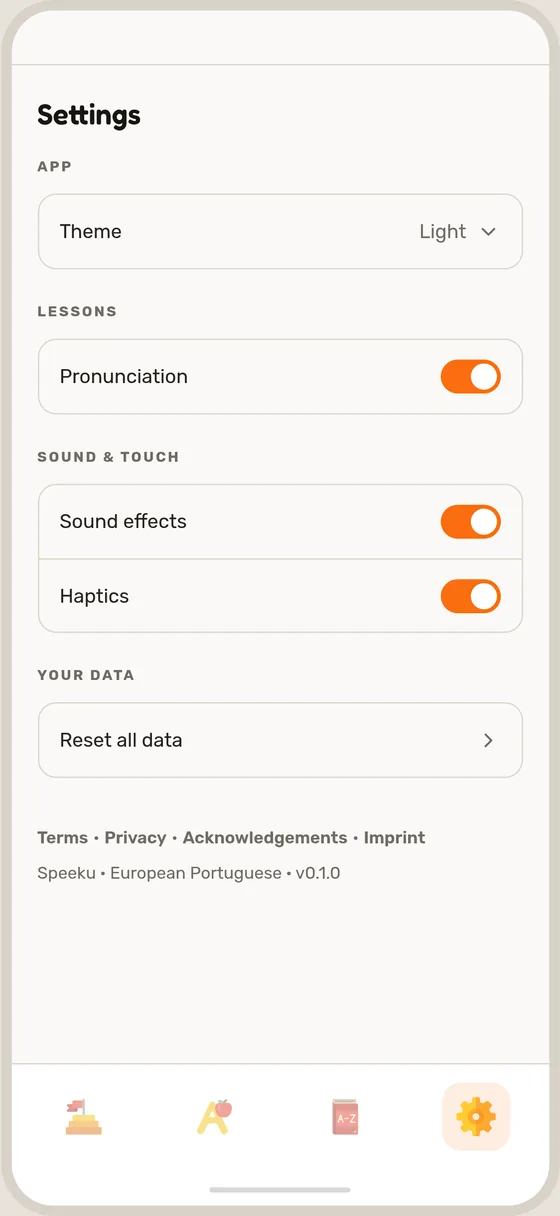
The app's language, theme, pronunciation guide, sound effects and haptics.
Open the Settings tab, the last one at the bottom of the screen. Nothing there is permanent, so try things out and change them back any time.
Language
Language is the first row. It changes the language the app speaks to you in: buttons, instructions and translations. The course you are learning stays the same.
The Swiss German app can be used in sixteen languages, including Albanian, French, Spanish, Turkish and Ukrainian. The European Portuguese app is in English.
Theme
Tap Theme and choose Light, Dark or System, which follows your phone.
Pronunciation
Under Lessons, the Pronunciation switch shows a written guide to how each word sounds on lesson cards. Turn it off if you prefer to rely on your ear.
Sound and touch
Under Sound & touch, switch Sound effects or Haptics off for a quieter app. The voices in your lessons keep playing.
